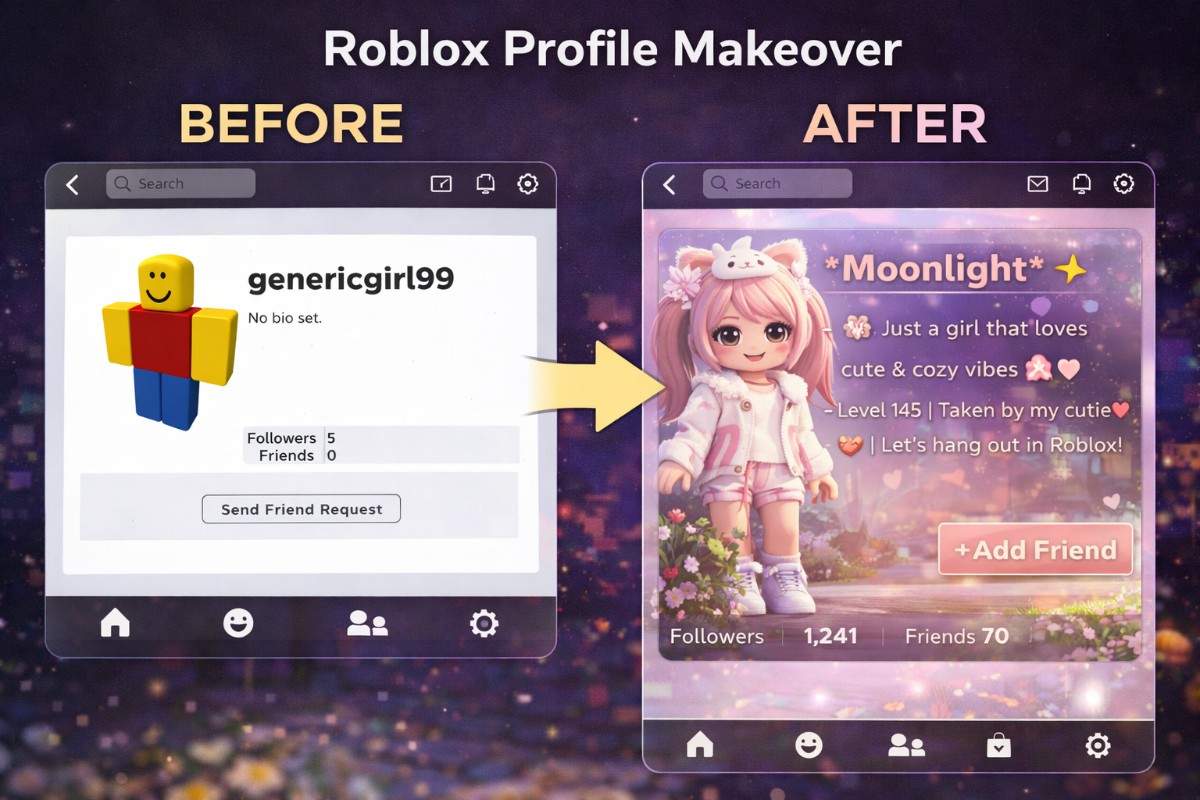
Why Your Roblox Profile Matters More Than Ever
Your Roblox profile isn't just a page with your username on it. In 2026, it's your digital identity across the entire platform. Every time someone adds you, every time you join an RP server, every time another player clicks your name, your profile is what they see.
A well-put-together profile tells other players three things instantly. First, you're an active player who actually cares about the game. Second, you've got a defined style and personality. Third, you're someone worth adding as a friend or inviting to a roleplay group.
On the flip side, a bare profile with the default avatar, no bio, and a random username tells players the exact opposite. It screams either "brand new player" or "I don't care about this platform." Neither message helps you make friends or get invited to anything.
The good news? Making your Roblox profile look amazing doesn't require spending a fortune on Robux. Most of what makes profiles stand out is completely free. You just need to know what to focus on.
In this guide, we're walking through every element of a standout Roblox profile, step by step. By the end, your profile will look like it belongs to someone who knows exactly what they're doing.
Step 1: Level Up Your Avatar
Your avatar is the most visible part of your profile. It shows up everywhere: on your profile page, in game, in friend lists, and on flex cards. Getting your avatar right is the foundation of a great profile.
Pick a Consistent Style
The number one rule of avatar design is consistency. If you're going for cute, everything should be cute: the hair, the face, the clothes, the accessories. If you're going emo, commit to it fully. Mixing random items from different styles creates visual chaos.
Here are the most popular avatar styles in 2026:
- Soft/Cute: Pastel colors, round faces, butterfly accessories, flower crowns
- Emo/Grunge: Black clothes, chains, stitched faces, dark hair with colored streaks
- Preppy: Bright colors, designer items, clean and polished looks
- Baddie: Luxury items, confidence outfits, gold accessories, sleek hair
- Anime: Anime hair, katanas, Japanese inspired accessories
- Y2K: Low rise jeans, butterfly clips, platform shoes, retro sunglasses
- Cottagecore: Floral dresses, straw hats, earthy tones, vintage vibes
Once you choose a style, every piece of clothing and accessory should support that style. This consistency is what separates profiles that look intentional from ones that look thrown together randomly.
Use the Avatar Shop Wisely
You don't need to buy the most expensive items. Some of the best-looking avatars on Roblox use free or cheap items combined creatively. Browse the Roblox Avatar Shop and filter by free items first. You'll be surprised how many great options cost nothing.
What matters more than price is how pieces work together. A free outfit that matches perfectly will always look better than an expensive outfit where nothing coordinates.
Pay Attention to Colors
Color coordination transforms an average avatar into a great one. Stick to two or three main colors. If your shirt is black and purple, your accessories and hair should include those same colors. Clashing colors make your avatar look messy even if each individual item is nice.
Step 2: Write a Bio That Gets Noticed
Your bio is the text content of your profile. While your avatar catches the eye visually, your bio is what makes people decide whether to interact with you. A blank bio is a wasted opportunity.
The Anatomy of a Perfect Bio
Every great Roblox bio contains these elements:
- Your RP name at the top, optionally framed with a decorative border
- Your character age and pronouns on the next line
- 2 to 3 personality or vibe lines that show who your character is
- Your main game or RP preference so people know your interests
- A closing line that's either funny, inviting, or sets a boundary
Match Your Bio Style to Your Avatar
This cannot be stressed enough. Your bio and avatar need to tell the same story. If your avatar is dressed in all pink with butterfly accessories, your bio should use cute emojis like 🌸, 💗, and 🎀. If your avatar is emo, your bio should use 🖤, ⛓️, and 💀.
The BioBlox Bio Generator makes this easy. Pick the style that matches your avatar, enter your character details, and the generator creates four perfectly styled bios instantly. No more staring at a blank text box wondering what to write.
Use Borders for Polish
Decorative borders frame your bio and make it look intentional. Borders like ✧˚ · text ·˚✧ or ♡₊˚ text ₊˚♡ at the top and bottom of your bio add that finishing touch. They take your bio from "good" to "this person clearly knows what they're doing."
Check out our complete bio ideas guide for hundreds of ready to copy examples across every style. Or if you want specifically aesthetic bios, our aesthetic bio copy paste collection has cottagecore, soft girl, dark aesthetic, Y2K, and more.
Step 3: Pick a Display Name That Fits
Your display name appears above your avatar in every game you play. It's the name other players see in chat, in friend lists, and on your profile. Unlike your username which is permanent, you can change your display name every 7 days for free.
Rules for a Great Display Name
- Keep it short: One or two words maximum. Long names get cut off on mobile and look cluttered above your avatar
- Make it readable: Other players need to be able to type your name in chat and say it in voice conversations
- Match your style: A cute avatar needs a cute name like "Blossom" or "Mochi," not a tough name like "Viper"
- Avoid numbers: Names like "Player2847" look lazy. If your name is taken, try a creative variation
- Skip the xXx: The era of xXx_DarkLord_xXx is over. Clean, simple names are what look good in 2026
We've got an entire article dedicated to Roblox display name ideas with hundreds of names organized by style. Whether you want something cute, aesthetic, emo, funny, or baddie, you'll find the perfect name there.
Step 4: Create a Flex Card
A flex card is the cherry on top of a great profile. It's a digital card that showcases your avatar, your account stats, your rarest items, and your flex score all in one beautiful design.
Flex cards are trending everywhere right now. TikTok, Discord, Instagram, Reddit. Players share and compare their cards to show off their accounts. If you don't have one yet, you're missing out on a huge trend.
Creating one takes about 30 seconds with the BioBlox Flex Card Generator. Just enter your username, pick from 30+ themes, and download. It's free, no signup needed. Read our full flex card guide for tips on choosing the perfect theme and sharing your card effectively.
Use Your Flex Card Everywhere
- Set it as your Discord profile picture in Roblox servers
- Post it on TikTok with a "rate my account" caption
- Share it in Discord flex channels
- Use it as your Instagram story with a poll sticker
- Post it on Reddit in r/roblox for community feedback
The Secret: Color Coordination
This is the single biggest difference between profiles that look "meh" and profiles that look stunning. Color coordination ties everything together.
Here's how to do it. Pick two or three colors based on your avatar. If your avatar wears pink and white, those are your colors. Now apply those colors everywhere:
- Avatar: Pink and white clothes, pink hair, white accessories
- Bio: Pink emojis (🌸, 💗, 🎀), no random blue or green emojis
- Display name: Something that matches the vibe like "Blossom" or "Rosie"
- Flex card theme: Bubblegum, Pastel, or Blossom theme (pink tones)
When someone visits your profile and sees this level of coordination, it immediately signals that you're a serious, detail-oriented player. Everything feels intentional. Everything clicks.
Color Palettes by Style
- Cute/Soft Girl: Pink, white, lavender, mint
- Emo/Grunge: Black, dark red, grey, purple
- Aesthetic: Beige, cream, sage green, dusty rose
- Baddie: Black, gold, red, white
- Preppy: Bright pink, lime green, sky blue, orange
- Y2K: Hot pink, silver, baby blue, lilac
- Cottagecore: Olive green, cream, burnt orange, brown
Profile Mistakes Everyone Makes
Knowing what to avoid is just as important as knowing what to do. Here are the most common profile mistakes.
Mismatched Everything
A dark emo avatar with a cute bubbly bio and a preppy display name. When nothing matches, your profile looks like three different people made it. Pick one style and commit to it across every element.
Too Many Emojis in the Bio
Emojis are great in moderation. One emoji per line looks clean. Five emojis per line looks chaotic. The goal is to make it easy to read, not turn your bio into a messy wall of icons.
Default Avatar
The default Roblox avatar tells everyone "I just made this account" or "I don't care." Even if you don't want to spend Robux, customize your avatar with free items from the Avatar Shop. There are thousands of free options.
Copying Someone Else Exactly
Taking inspiration from other profiles is fine. Copying everything exactly is not. Other players notice when two profiles look identical and it makes both players look unoriginal. Use templates and ideas as starting points, then customize.
Never Updating
A profile set in 2023 and never touched looks outdated. Roblox styles change. New items come out. Your interests evolve. Update your avatar, bio, and display name regularly to keep things fresh. Changing your bio monthly and your avatar weekly is a good rhythm.
Profile Tips by Game
Different Roblox games have different profile expectations. Here's how to optimize by game.
Brookhaven
Brookhaven is all about character depth. Your bio should include your RP character name, age, role, personality, and what kind of RP you're looking for. Avatar should match your character exactly. If you're playing a rich character, dress rich. Check our Brookhaven bio guide for game-specific examples.
Bloxburg
Bloxburg players care about aesthetics and building. Your bio should highlight your building style or design interests. Avatars tend to lean aesthetic, preppy, or cottagecore. Mention your build specialty (modern, cottage, mansion) in your bio.
Da Hood
Da Hood profiles need to show confidence and toughness. Short, punchy bios with no soft emojis. Baddie and emo avatar styles dominate here. Your flex card matters a lot in Da Hood because players judge accounts based on stats and inventory.
Berry Avenue
Berry Avenue is similar to Brookhaven but leans more fashion focused. Preppy and soft girl avatars are incredibly popular. Your bio should emphasize personality and relationship preferences for RP. Fashion forward display names work best.
Anime Games
For games like Anime Fighters Simulator and similar titles, anime themed profiles perform best. Japanese styled display names, anime bio formatting with brackets like 「」, and avatars with anime hair and accessories create the perfect fit.
What You Can Do for Free vs With Robux
Not everyone has Robux to spend, and that's totally fine. Here's what you can do for free versus what requires spending.
Completely Free
- Write an amazing bio (use the BioBlox Bio Generator)
- Change your display name every 7 days
- Customize your avatar with free items from the Avatar Shop
- Create a flex card with the BioBlox Flex Card Generator
- Choose from thousands of free hair styles, faces, clothes, and accessories
- Add free UGC (User Generated Content) items to your avatar
Requires Robux
- Premium avatar items and limited editions
- Changing your username (display name changes are free)
- Certain exclusive catalog items
- Trading for rare limited items
The reality is that 80% of what makes a profile great is free. A well-coordinated bio, a thoughtful display name, a flex card, and a creatively assembled avatar using free items will outperform a lazily assembled profile with expensive items every single time.
The Weekly Profile Refresh Routine
The best Roblox profiles aren't set once and forgotten. They evolve. Here's a simple weekly routine to keep your profile looking fresh.
Monday: Avatar Check
Browse the Avatar Shop for any new free items. Try one small change to your look. A new accessory, a different hair color, or a seasonal item. Small tweaks keep your avatar feeling current.
Wednesday: Bio Update
Revisit your bio. Is it still accurate? Does it still match your avatar? If you changed games or switched RP styles, update your bio to reflect that. Use the bio generator to explore new options.
Friday: Flex Card Refresh
Generate a new flex card with your updated avatar. Try a different theme than last week. Share it on Discord or TikTok. Your flex score might have changed based on new friends or items.
Once a Month: Full Review
Step back and look at your entire profile as if you were a stranger. Does the avatar, bio, display name, and flex card all tell a cohesive story? If anything feels off, adjust it. This monthly review keeps your profile consistently excellent.
Your Profile Makeover Checklist
Here's your complete checklist. Work through this and your profile will be in the top tier on Roblox.
- Choose a single style for your profile (cute, emo, aesthetic, baddie, etc.)
- Pick 2 to 3 colors that define your style
- Dress your avatar to match your chosen style using those colors
- Write a bio that matches your avatar style (use BioBlox)
- Add a decorative border to your bio
- Choose a display name that fits your vibe
- Generate a flex card with a matching theme
- Share your flex card on Discord or TikTok
- Set a reminder to refresh your profile weekly